
What DealWorthIt Does: Underwriting, Deal Search and Scenario Analysis
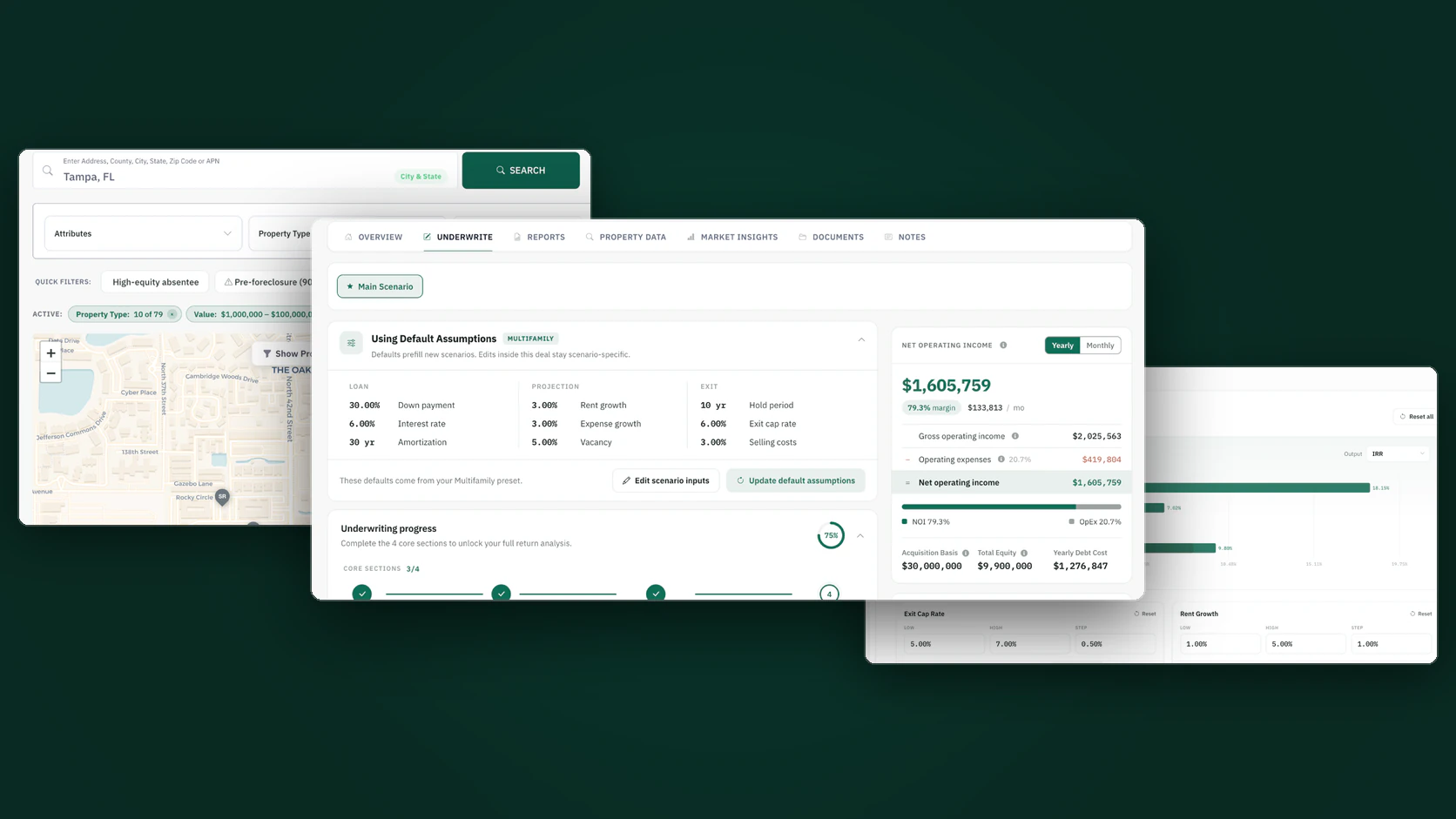
DealWorthIt is real-estate underwriting software. It helps investors search for properties, research a property before they commit to it, import and read financial documents, build an underwriting scenario, and review the returns that scenario produces. What is available depends on the property type you are analyzing and on the plan the account holds.
The software supports the analysis and the decision. It does not make the decision. It cannot tell you whether a deal is worth buying, and it does not decide whether you should invest — every number it produces is a function of the assumptions you enter and the third-party data it retrieves.
Disclosure: DealWorthIt publishes this guide about its own software. Product capabilities described here were checked against the application as of August 2026. This is not an independent review, and you should treat it as a description of what the product does rather than as a recommendation to buy it. Where a capability is limited, gated to a higher plan, or absent, this guide says so.
What DealWorthIt Is
DealWorthIt is a web application for underwriting income-producing real estate. It sits between the point where you find a property and the point where you make an offer, and its job is to hold the inputs, assumptions and outputs of an analysis in one place instead of in a spreadsheet that gets rebuilt for every deal.
A complete pass through the product runs from search, to the property research profile, to an underwriting workspace, to document import, to the return metrics — and, on plans that include them, to alternative scenarios and a stress test of the assumptions behind them. Here is the short version of what is available, and where the limits are:
| Capability | What it does | Availability or limitation |
|---|---|---|
| Property search | Searches on-market and off-market properties with filters for equity, ownership type, distress signals, size and price | Available on an active plan; results come from a third-party property-data vendor |
| Property research profile | Ownership, estimated equity, mortgage and lien detail, tax and assessment values, sales history, MLS listing history, foreclosure and auction records, property characteristics | Available on an active plan |
| Property comparables | Comparable sales for the subject property with $/sq ft and a comparison against the subject | Available in the property research area of a deal, not inside the underwriting model |
| Valuation estimate | A value figure that is labeled with its own source — vendor estimate, assessor market value, assessment-ratio figure or tax value | Available where the vendor returns one; it is an estimate, not an appraisal |
| Market benchmarks | Rent benchmarks, demographics, employment data, a market score, a market verdict and a data-coverage panel showing each figure's source and confidence | A tab on the detailed multifamily and self-storage workspace, which any active plan can open; drawn from public federal datasets and cached |
| Core underwriting | Property, loan, income and expense inputs, and the returns they produce — NOI, debt service coverage, debt yield, cash-on-cash return, IRR, equity multiple | Available on any active plan |
| Detailed multifamily and self-storage underwriting | The dedicated detailed workspace for those two asset types — the surface most of this guide describes | Opens on any active plan; the Advanced Analysis group inside it requires a Gold or Diamond plan. A teammate invited by a Gold or Diamond account gets those surfaces too |
| Pro forma projections | Hold period, growth and inflation assumptions, exit cap rate, lease-up ramp, reserves and selling costs | Requires a Gold or Diamond plan |
| T12 and rent roll import | Reads a trailing twelve-month statement or rent roll and maps it into the model, with a review step before the values are applied | Requires a Gold or Diamond plan |
| Multiple scenarios and comparison | Builds alternative versions of the same deal and compares them side by side | Every plan carries scenarios (Silver 3 per deal, Gold 10, Diamond unlimited); side-by-side comparison requires a Gold or Diamond plan |
| Sensitivity analysis | Sweeps one variable across a range to show which assumption moves the return most | Requires a Gold or Diamond plan; the section appears once the model has enough inputs for the sweep to compute |
| Refinance and lender sizing | Models a refinance year, loan-to-value, and minimum coverage and debt-yield constraints | Requires a Gold or Diamond plan |
| Syndication waterfall | Equity splits, preferred return, and general-partner distribution | Requires a Gold or Diamond plan |
| Skip tracing | Looks up owner contact information from within a property record | Metered — each plan carries a monthly free allowance, and traces beyond it are charged against the account wallet balance |
| Team collaboration | Invites teammates into the account so they can work on the same deals | Requires a Diamond plan |
| Reports | Generates a shareable analysis report, with private links for sharing outside the account | The deal report and PDF are included on every paid plan, on every deal type; saving, customizing and managing reports in the Report Center requires a Gold or Diamond plan, and a report link already shared stays viewable without one |
| White label | Serves the product under a partner brand | Arranged with DealWorthIt, not self-serve |
Who DealWorthIt Is Designed For
The product is built around the analysis an individual investor or a small acquisitions team does before making an offer. That includes buy-and-hold multifamily investors, self-storage buyers, single-family investors running buy-and-hold, fix-and-flip or wholesale numbers, and sponsors who need to model an equity split for outside investors.
It is a poor fit if you need something it does not do. Property management, accounting, tenant screening, construction draw tracking and portfolio-level asset management are outside its scope. It is also a poor fit if your asset class is not on the supported list below — the analysis depth is uneven across property types, and a type that is not explicitly supported is not supported by approximation.
Investment Workflows DealWorthIt Supports
These are the shipped, reachable analysis workflows:
- Multifamily — the deepest of them. Full rent roll and operating statement handling, pro forma projections, financing, exit assumptions and investor economics. The detailed multifamily workspace opens on any active plan; its Advanced Analysis group requires a Gold or Diamond plan. See our step-by-step multifamily underwriting guide for the underlying method.
- Self-storage — supported as its own analysis type with its own assumptions. Worth knowing before you rely on it: the underwriting guidance layer deliberately declines to suggest a stabilized vacancy for self-storage, because the public datasets it draws on measure residential occupancy and do not measure self-storage occupancy. It leaves your assumption alone rather than substituting a residential figure. Background reading: how to analyze self-storage investments.
- Single-family buy and hold — a rental analysis for one-to-four-unit property.
- Fix and flip, and wholesale — separate entry points sized to those strategies rather than a multifamily model with the units set to one.
It is worth being blunt about how the tiers split this up, because it is the single thing most likely to surprise an evaluator: the split runs through the middle of the detailed workspace rather than around it.
On any active plan you can search and research properties, run skip traces, and create deals in every workflow — the single-family strategies, the quicker screening analyses, and the Detailed Underwriting workspace for multifamily or self-storage — with the core inputs and returns those produce. What sits behind Gold inside the detailed workspace is the Advanced Analysis group: growth and exit assumptions, value-add improvement modeling, pro forma projections, sensitivity analysis and the syndication waterfall. It renders visibly locked rather than silently missing, and the application names the tier in plain language. A teammate invited by a Gold or Diamond account gets those advanced surfaces under that account's plan.
Gated separately, and also requiring Gold or Diamond: document import, scenario comparison, refinance modeling and Report Center report management. Every paid plan carries a scenario count of its own — Silver includes 3 scenarios per deal, Gold 10, Diamond unlimited — and every paid plan includes the deal report with PDF download on every deal type. Every one of these gates is enforced on the server, not only in the interface.
Finding and Researching Properties
Property search covers both on-market and off-market inventory. On-market filters include listing price and days on market for the listing itself. Off-market filters target the situations investors actually look for: high equity, free and clear, absentee and corporate ownership, trust-owned and inherited property, tax-delinquent records, pre-foreclosure, foreclosure, bank-owned and auction status, negative equity, and length of ownership. You can also filter on units, beds and baths, building and lot size, year built, assessed values, mortgage balance and loan-to-value, and draw a polygon to bound the search area.
Search covers a wide set of property classifications — multifamily, single-family, storage, retail, office, land, lodging and others. That is a search classification, not a statement that every one of those types has a matching underwriting model. Search breadth and underwriting depth are two different things in this product, and it is worth keeping them separate in your head when you evaluate it.
Once you open a property, the research profile is organized into sections: an overview, physical details, ownership, financial detail, location, and sales history. Between them they show current owner and mailing address, estimated value and estimated equity, estimated mortgage balance and open liens with deed and document dates, annual tax and assessed land and improvement values, assumable and auction flags, flood-zone information, jurisdiction, and the full recorded sales history alongside MLS listing history.
Skip tracing runs from inside the property record, so you do not have to move owner details into a separate tool to find contact information. It is metered: each plan carries a monthly free allowance, that allowance resets on the calendar month, and traces beyond it are charged at a fixed per-trace rate against the account wallet balance. Team members working under an account administrator's plan are not metered individually.
Property Data, Comparables and Market Benchmarks
This is the area where software marketing tends to overstate, so it is worth being precise about what exists and where it lives.
Property comparables are real and they are available in the property research area of a deal. DealWorthIt requests comparable records from its property-data vendor alongside the subject property's detail record, stores them, and renders them with dollar-per-square-foot figures and a comparison against the subject — the subject's estimated value, the median comparable value and the median comparable dollar per square foot are shown together.
What that does not mean is that comparable data is automatically pushed into the underwriting model. The comparables sit on the property research side of a deal. Rental comparables are a separate matter again: the application has the analysis layer for them — unit-type matching, effective rent, weighted and median aggregates — but the comps themselves have to be supplied, and where none have been supplied the screen says so rather than showing an invented figure.
The valuation estimate shown against a property is labeled with the kind of figure it actually is. Depending on what the vendor returns for that record it resolves to a genuine automated valuation, an assessor's full market value, an assessment-ratio figure, or a tax value, and the caption changes accordingly. That labeling matters: an assessment-ratio number is a real figure but it is not a market value, and the software says which one you are looking at. None of them is an appraisal.
The market data attached to a deal comes from named public sources rather than a proprietary dataset. Note the scope before you weigh it: this whole layer is a tab on the detailed multifamily and self-storage workspace — the single-family and quick screening analyses do not carry it, unlike the property research above, which every workflow reaches.
| Market figure | Source | What it is |
|---|---|---|
| Rent benchmarks | HUD Fair Market Rents and Census ACS median gross rent | Published benchmark rents for the geography, used to sanity-check your rent assumptions |
| Demographics | Census American Community Survey | Population, household and income characteristics |
| Employment and economy | Bureau of Labor Statistics | Local employment levels and unemployment rate |
| Market score | Computed from the above | A composite score, shown with a confidence level and a coverage percentage |
| Vacancy outlook | Derived from employment signals | A suggested range with a stated reason — guidance, not an observed vacancy rate |
| Benchmark interest rates | New York Fed and U.S. Treasury published series | Daily official published rates, not intraday quotes |
| Market verdict and outlook | Computed from the rows above | A verdict, an outlook rating and a suggested action for the market |
Three honesty notes about that table. First, the written market summary, the market verdict and the underwriting guidance are all produced by deterministic rules from those sourced figures — the same inputs always give the same output, and where coverage is too thin the software returns "market data unavailable" instead of generating something. Second, the vacancy row is guidance derived from employment indicators with a stated methodology. It is not an observed vacancy rate for your submarket, and it should not be treated as one. Each figure carries its source label and period, and a coverage panel shows which components were available and at what geography.
Third, and worth reading carefully: the last row is the one most easily over-read. The market layer does put a label on a market — an outlook rating drawn from a fixed ladder that runs from "High-Risk Market" up to "Strong Buy Signal", a verdict, a headline opportunity and risk, and a short "recommended action". Those are rule-based reads of the public data above, about the market, not about your deal, your price or your assumptions. Nothing in them has seen your underwriting, and none of it is investment advice. Treat the rating as a shorthand for the score that produced it, not as a verdict on the property.
DealWorthIt does not publish observed market cap-rate data. Every cap rate in the product — the exit cap, the refinance cap — is an assumption you enter.
Importing T12 and Rent Roll Documents
Document import reads a trailing twelve-month operating statement or a rent roll and maps its line items into the model, with a review and validation step before anything is applied. It is the part of the product that removes the most manual work, because retyping a hundred-line operating statement is where transcription errors enter an analysis.
Document import requires a Gold or Diamond plan. The application enforces this on the server, not just in the interface — an account without the entitlement gets an explicit message saying import needs the higher tier. If you evaluate the product on a lower tier and conclude that import does not work, that is the gate, not a fault.
This is also the one place in the product where a language model is genuinely doing the work: a third-party model reads the document, including scanned PDFs, and classifies each line item into an income or expense category before the values are carried into the right fields. That is a specific, checkable claim, and it is the reason the review step exists. Read what came through — an import is a starting point you verify against the source document, not a substitute for reading it. Our guides on analyzing a T12 statement and reading a rent roll cover what to check.
Building an Underwriting Analysis
The underwriting workspace produces the standard set of figures an acquisitions analysis needs: gross and effective income, operating expenses, net operating income, debt service coverage ratio, debt yield, cash-on-cash return, internal rate of return and equity multiple.
Pro forma projections extend that over a hold period. The projection inputs cover hold year, income and expense inflation, vacancy assumptions, appreciation, replacement reserve treatment, selling costs, an exit cap rate and the basis on which exit NOI is calculated. There is also lease-up modeling — start and stabilization months, starting and stabilized occupancy, a rent factor at each end, and a ramp shape — for property that is not stabilized at acquisition. Projections sit in the Advanced Analysis group and require a Gold or Diamond plan; the core workspace below them does not.
Historical figures and projected figures are handled separately: what the property has actually done sits alongside what your assumptions say it will do, which is the comparison that matters when a seller's pro forma is more optimistic than the trailing twelve months justifies.
The most useful way to evaluate underwriting software is on a property you already understand. Build the analysis in DealWorthIt and compare its output line by line against the numbers you reached yourself.
Create an account →Comparing Scenarios and Testing Assumptions
A single set of assumptions tells you very little, because the assumptions are the argument. The scenario tools let you build alternative versions of the same deal — a different purchase price, a different rent growth path, a different exit — and compare them side by side.
Sensitivity analysis approaches it from the other direction. It sweeps one variable across a range while holding the rest at base, and shows which assumption moves the chosen output the most. That is usually more informative than the base case itself: if the answer swings on exit cap rate, you have learned that your deal is a bet on the exit rather than on operations.
Every plan carries scenarios — Silver includes 3 per deal, Gold 10, Diamond unlimited — while side-by-side scenario comparison and sensitivity analysis require a Gold or Diamond plan. The comparison entitlement is enforced on the server. If you are evaluating specifically for comparison work, evaluate on a plan that includes it. Our guide to using multiple scenarios in a deal explains why the practice is worth the tier.
Value-add improvement modeling — testing what a rent increase or a renovation program does to net operating income and returns — sits in the same Advanced Analysis group and carries the same requirement.
Financing, Returns and Investor Economics
On the debt side, the model handles the loan terms you would expect and adds a refinance path: refinance year, loan-to-value, interest rate, loan and amortization term, interest-only period, closing-cost rate, and minimum debt service coverage and debt yield constraints. Those last two are lender-sizing inputs — they constrain what the refinance can actually support rather than assuming the refinance happens at whatever proceeds you would like.
There is capital-stack handling for deals with more than one source of funds, including a rebalance calculation and a check for an underfunded stack.
For syndicated deals, the equity split supports split type, preferred return, preferred-return accrual basis, member groups and general-partner distribution — the waterfall mechanics a sponsor needs to show a limited partner what they receive and when. This sits in the Advanced Analysis group and requires a Gold or Diamond plan.
Benchmark rates — SOFR, SOFR averages, the effective federal funds rate and the Treasury par yield curve — are retrieved from the New York Fed and U.S. Treasury published feeds. These are daily official published rates. They are a reference point for your interest-rate assumption, not a quote and not an offer of financing. The picker that surfaces them sits in the detailed workspace's loan section, so it carries that workspace's Gold or Diamond requirement.
For a worked example of these mechanics end to end, see our hypothetical $2M multifamily walkthrough.
Collaboration, Reporting and White Label
Team collaboration lets an account administrator bring teammates into the account to work on the same deals. It requires a Diamond plan. Seat counts are set by the plan, and because published seat figures have not been consistent across the application's own surfaces, this guide does not state a number — check the current plan detail before you buy on that basis.
Reports present a shareable version of an analysis, with private links for sharing outside the account. The deal report and PDF are included on every paid plan, on every deal type. Saving, customizing and managing reports in the Report Center — generating a saved report there included — requires a Gold or Diamond plan: the advanced-reports entitlement, enforced on the server for every deal type, not only for multifamily; the refusal names the tier. A report link that has already been shared stays viewable without a plan, which is the point of sharing it. Report coverage is not identical across every property type — it is most complete for multifamily.
The detailed report also carries a Deal Score: a 0–100 composite calculated by fixed arithmetic from the underwriting inputs you supplied, shown with a threshold label — "Strong Buy · Above Threshold" at 70 and above, "Hold · Within Tolerance" at 50 to 69, "High Risk · Not Recommended" below 50 — and a matching status badge ("Approved", "Hold", "Under Review") in the report header. It is part of the detailed report, so it is included on every paid plan. Four dimensions carry weight, all of them derived from your own figures: return profile (IRR and cash-on-cash), capital structure (DSCR, debt yield and loan-to-value), rent growth outlook, and exit liquidity. Four more — market and submarket, walkability, demographics and sponsor quality — are listed on the same panel but display as "Not scored" and contribute nothing to the total.
Read that score for what it is. It is deterministic arithmetic, not AI, and the same inputs always produce the same number. It does not check whether your assumptions are right — a score computed from optimistic rent growth and an invented exit cap is an optimistic score, not a sound deal. It does not compare your deals against one another or against the market. And despite the wording of the labels, it is not an appraisal, a lending decision, an approval, or a recommendation to buy: it is DealWorthIt's formula reporting where your own numbers fall against thresholds DealWorthIt chose. Change an assumption and the label moves with it.
White-labelling exists and is in use: the application ships more than one brand configuration, so coaches and partners can deliver the product under their own brand. It is arranged with DealWorthIt rather than switched on from inside the account.
What DealWorthIt Does Not Currently Do
This section is here because it is the part most product pages leave out, and because it is the fastest way for you to decide whether to keep reading or stop.
- It does not rank or prioritize your deals against one another. There is no engine that reads your investment criteria, compares your deals and elevates the best ones, and no surface sorts a pipeline by quality. Two things it does produce should not be mistaken for that. The detailed report scores the individual deal — the 0–100 Deal Score described above, computed from your own underwriting inputs and labeled against fixed thresholds. The detailed workspace separately produces a market-level read: a market score, an outlook rating, a verdict and a suggested action, computed by fixed rules from public data about the market, not about your deal. Neither is a comparison across your properties, and neither is investment advice.
- It does not run an AI property search. That capability exists in the codebase behind a switch that is set off and is not driven by configuration, which means it is off everywhere.
- It does not automatically pull comparables into the underwriting model. Property comparables are in property research, as described above.
- It does not publish observed market cap rates, value forecasts, days-on-market statistics or absorption data. No surface you can reach reports them, and the legacy market-explorer endpoints that once carried placeholder figures for them now answer "gone".
- It does not report an observed vacancy rate for your submarket. What it offers is a derived outlook with a stated methodology.
- It does not support construction or development underwriting. That work is behind a configuration flag that defaults off.
- It does not offer a dedicated mobile-home-park model. Manufactured-housing communities have their own economics, and approximating them with a multifamily model would produce a misleading answer.
- It does not provide a trial period. The general three-day evaluation period ended on July 31, 2026.
- It is not an appraisal, and it does not replace one. Nor does it replace a lender, an accountant, an attorney, an inspector or an engineer.
It is also worth saying plainly what this guide will not claim. We have no published, verified figure for how many people use DealWorthIt, how much time it saves, or how its accuracy compares against any other product. Because we do not have those numbers in a form anyone could check, they do not appear here.
How to Evaluate DealWorthIt Using a Deal You Already Understand
The most reliable way to evaluate any underwriting tool is to run a deal whose answer you already know, and see whether the software agrees with you and where it disagrees. A demo on someone else's property tells you about the demo.
- Pick a property you have already underwritten by hand — ideally one you have owned or passed on, so you know how it turned out.
- Create the analysis and enter your acquisition and financing assumptions manually first, before importing anything. This tells you whether the calculation engine agrees with your spreadsheet on the same inputs.
- Check net operating income, debt service coverage and debt yield against your own numbers. If they differ, find out why before going further — the usual culprits are expense categorization and how reserves are treated.
- Then import the rent roll and trailing twelve-month statement, and compare what the import produced against the source documents line by line. You are testing the extraction, so read the output critically.
- Build a second scenario with a materially worse assumption — a higher exit cap, slower rent growth — and confirm the comparison shows you what changed and by how much.
- Run a sensitivity sweep on the variable you think matters most, and see whether the software agrees that it is the one that moves the return.
- Generate a report and read it as if you were the person receiving it. If it does not communicate the deal, that matters as much as whether the arithmetic is right.
One caveat on that walkthrough: it describes the detailed workspace throughout, so running it as written needs a Gold or Diamond plan from step two onward. On a lower tier you can still do steps one and three against the screening and single-family analyses, but you will not reach import, scenarios, sensitivity or the report. If you are evaluating those specifically, evaluate on a tier that includes them, because their absence on a lower tier is a gate rather than a limitation of the product.
Frequently Asked Questions
Does DealWorthIt tell me whether a deal is good?
Not in a sense you should rely on. It calculates the outcome of the assumptions you give it and shows you how sensitive that outcome is to each one. The detailed report does print a 0–100 Deal Score with a label such as "Strong Buy", "Hold" or "High Risk", but that label is fixed arithmetic on the figures you entered, measured against thresholds DealWorthIt chose — it does not verify your assumptions, and it is not an appraisal, an approval or a recommendation. Judging whether the deal is worth doing — and whether the assumptions are reasonable — is your work. The software does not decide whether you should invest.
Are property comparables available?
Yes, in the property research area of a deal, sourced from DealWorthIt's property-data vendor and shown with dollar-per-square-foot detail and a comparison against the subject property. They are not automatically imported into the underwriting model, and comparable coverage depends on what the vendor holds for that property and market — it is not guaranteed for every address.
Is the valuation estimate an appraisal?
No. It is an estimate, and the interface labels which kind of estimate it is — an automated valuation, an assessor's market value, an assessment-ratio figure or a tax value. An appraisal is a licensed professional opinion of value produced under a defined standard, and this is not that.
Which property types can DealWorthIt underwrite?
Multifamily, self-storage, and single-family under buy-and-hold, fix-and-flip and wholesale strategies. Multifamily is the deepest. Property search covers a much wider set of classifications than underwriting does, so being able to find a property type is not the same as being able to model it.
Can DealWorthIt model mobile home parks?
No. There is no dedicated manufactured-housing model, and using the multifamily one as a substitute would misstate the economics — park-owned versus tenant-owned homes, lot rent, and utility infrastructure all behave differently.
Is every feature available on every plan?
No. Core underwriting — property, loan, income and expense inputs and the returns they produce — is available on any active plan, as are property search, the property research profile, skip tracing, the detailed multifamily and self-storage workspace, scenarios (Silver includes 3 per deal, Gold 10, Diamond unlimited) and the deal report with PDF download on every deal type. What requires a Gold or Diamond plan is the depth inside the workspace — pro forma projections, value-add improvement modeling, sensitivity analysis and the syndication waterfall — along with document import, scenario comparison, refinance modeling and Report Center report management. Team collaboration requires a Diamond plan. These gates are enforced by the server, so the interface and the entitlement agree.
Does DealWorthIt use AI?
In one place, substantively: document import uses a third-party language model to extract values from a T12 or rent roll and classify the line items, which is why that step gets a review screen before anything is applied. Everything else people assume is AI is not. The market summary, the market verdict and the underwriting guidance are produced by deterministic rules from sourced public data — the same inputs always give the same output, and no language model is involved. The returns are ordinary arithmetic, and so is the detailed report's Deal Score — a fixed formula over your own inputs, with no language model anywhere in it. There is no AI that scores your deals, ranks opportunities or recommends what to buy.
How long does an analysis take?
That depends on the deal, the quality of the documents and how much you already know about the property. We do not publish a figure, because any number we quoted would describe one analyst working on one property under conditions we chose, and it would not predict yours.
Methodology and Product Verification
Every product statement in this guide was checked against the DealWorthIt application source as of August 2026 — the routes, views, entitlement configuration and feature flags that determine what a user can actually reach — rather than against marketing material. Where a capability exists in the code but is switched off, this guide treats it as unavailable, because code that is not reachable is not a feature. Plan requirements come from the application's own entitlement configuration, which is enforced on the server; data sources come from the services that fetch them. Where the application declines to produce a figure — self-storage vacancy, a market score with insufficient coverage — this guide reports the decline rather than the figure.
Software changes. This describes the product as of August 2026; verify anything you intend to rely on against the current application before you buy on the strength of it.
Disclaimer
Outputs from DealWorthIt depend entirely on the inputs you provide and on data supplied by third parties, which may be incomplete, out of date or wrong for a given property. You must verify your assumptions and read the source documents yourself.
DealWorthIt is not an appraisal and does not produce one. It does not provide legal, tax, accounting, lending or investment advice, and it is not a substitute for a licensed professional in any of those fields. Software output does not guarantee investment performance, and no analysis eliminates the risk of loss.
Ready to analyze your next deal?
Find, research, analyze, compare, and present real estate deals with DealWorthIt.
← Back to all articles